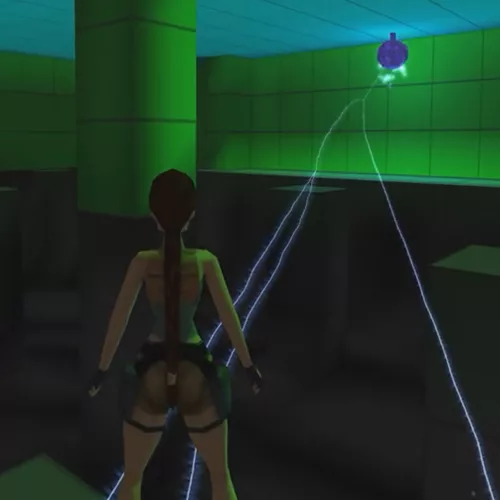
The Electric Ball is a trap object in TombEngine. It attacks Lara with lightning arcs and can target Impact Points.
Configure its behavior using ItemFlags and OCB. Set item flags by using a node.
Placement
- Electric Ball object: Place
ELECTRIC_BALL in the desired room.
- Impact points (optional): Add one or more
ELECTRIC_BALL_IMPACT_POINT objects in the same room.
- OCB matching: Set Impact Point OCB to match the Electric Ball’s OCB so they link correctly.
ItemFlags Reference
- ItemFlags[0] – Switch-off distance (default 7 blocks). Powers down if Lara/targets are farther than this.
- ItemFlags[1] – Attack distance (default 3 blocks). Attacks Lara if she is within this range and line of sight is clear.
- ItemFlags[2] – Target type or ID. Idle (None), Lara (Target), or chosen impact point index.
- ItemFlags[3] – Attack cooldown timer (~70). Higher = longer delay between lightning cycles; lower = faster.
- ItemFlags[4] – Glow/visual intensity timer (~70). Controls how long sparks, smoke, and glow effects persist.
- ItemFlags[5] – Target entity index. Auto-set to Lara’s index or selected impact point.
- ItemFlags[6] – Damage ticks (default 20). Each tick applies 40 HP damage if Lara is exposed.
Setup Instructions
- Place
ELECTRIC_BALL in the target room.
- (Optional) Add Impact Points with matching OCB values.
- Set ItemFlags[0] for switch-off distance.
- Set ItemFlags[1] for Lara attack distance.
- Lower ItemFlags[3] to reduce time between attacks.
- Lower ItemFlags[4] to shorten glow/smoke duration.
- Lower ItemFlags[6] to reduce sustained damage per cycle.
- Test in-game and adjust values until attack frequency and intensity feel balanced.
Example Configurations
Standard Ball
ItemFlags[0] = 7;   // switch-off distance
ItemFlags[1] = 3;   // attack distance
ItemFlags[3] = 70;  // cooldown
ItemFlags[4] = 70;  // glow decay
ItemFlags[6] = 20;  // damage ticks
Fast-Attack Ball
ItemFlags[0] = 7;   // switch-off distance
ItemFlags[1] = 3;   // attack distance
ItemFlags[3] = 40;  // shorter cooldown
ItemFlags[4] = 60;  // faster glow decay
ItemFlags[6] = 10;  // fewer damage ticks
Tips
-
- Reduce ItemFlags[3] to shorten cooldown between attacks.
- Reduce ItemFlags[6] for shorter bursts of damage.
- Use OCB linking to connect Electric Balls with Impact Points.
- Always test values in-game to balance difficulty.