Electric Ball
WadTool Slot Number: 451
				
					TEN.Objects.ObjID.ELECTRIC_BALL


Setup Instructions

  • The Electric Ball is a trap object in TombEngine. It attacks Lara with lightning arcs and can target Impact Points.
    Configure its behavior using ItemFlags and OCB. Set item flags by using a node.Placement

    • Electric Ball object: Place ELECTRIC_BALL in the desired room.
    • Impact points (optional): Add one or more ELECTRIC_BALL_IMPACT_POINT objects in the same room.
    • OCB matching: Set Impact Point OCB to match the Electric Ball’s OCB so they link correctly.

    ItemFlags Reference

    • ItemFlags[0] – Switch-off distance (default 7 blocks). Powers down if Lara/targets are farther than this.
    • ItemFlags[1] – Attack distance (default 3 blocks). Attacks Lara if she is within this range and line of sight is clear.
    • ItemFlags[2] – Target type or ID. Idle (None), Lara (Target), or chosen impact point index.
    • ItemFlags[3] – Attack cooldown timer (~70). Higher = longer delay between lightning cycles; lower = faster.
    • ItemFlags[4] – Glow/visual intensity timer (~70). Controls how long sparks, smoke, and glow effects persist.
    • ItemFlags[5] – Target entity index. Auto-set to Lara’s index or selected impact point.
    • ItemFlags[6] – Damage ticks (default 20). Each tick applies 40 HP damage if Lara is exposed.

    Setup Instructions

    • Place ELECTRIC_BALL in the target room.
    • (Optional) Add Impact Points with matching OCB values.
    • Set ItemFlags[0] for switch-off distance.
    • Set ItemFlags[1] for Lara attack distance.
    • Lower ItemFlags[3] to reduce time between attacks.
    • Lower ItemFlags[4] to shorten glow/smoke duration.
    • Lower ItemFlags[6] to reduce sustained damage per cycle.
    • Test in-game and adjust values until attack frequency and intensity feel balanced.

    Example Configurations

    Standard Ball

    ItemFlags[0] = 7;   // switch-off distance
    ItemFlags[1] = 3;   // attack distance
    ItemFlags[3] = 70;  // cooldown
    ItemFlags[4] = 70;  // glow decay
    ItemFlags[6] = 20;  // damage ticks
    

    Fast-Attack Ball

    ItemFlags[0] = 7;   // switch-off distance
    ItemFlags[1] = 3;   // attack distance
    ItemFlags[3] = 40;  // shorter cooldown
    ItemFlags[4] = 60;  // faster glow decay
    ItemFlags[6] = 10;  // fewer damage ticks
    

    Tips
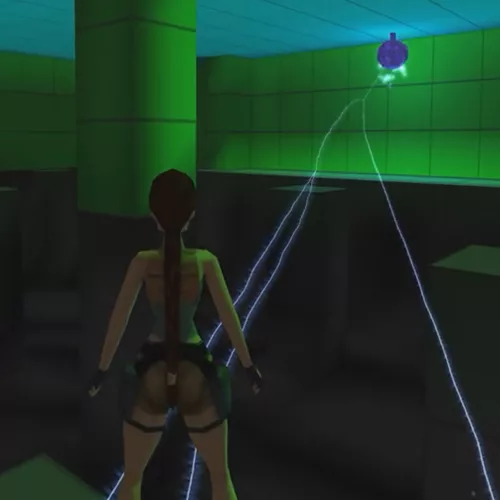
    • Reduce ItemFlags[3] to shorten cooldown between attacks.
    • Reduce ItemFlags[6] for shorter bursts of damage.
    • Use OCB linking to connect Electric Balls with Impact Points.
    • Always test values in-game to balance difficulty.