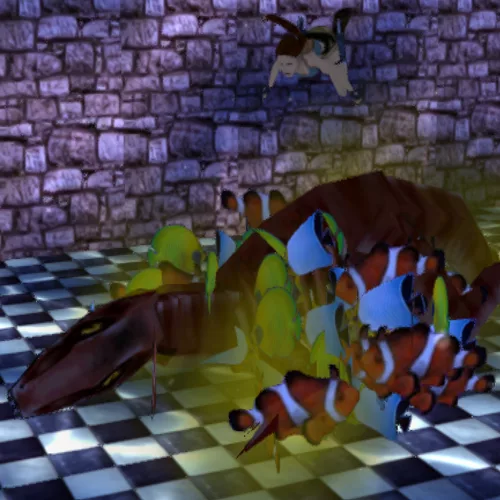
You can add multiple versions of fish by adding a mesh in the skeleton editor inside Wadtool. The fish uses the meshes from the FISH_EMITTER object. Mesh 0 should be a common nullmesh.
You can set the number of fish by using a node in Tomb Editor to change the Hit Points of the FISH_EMITTER.
OCBs
- You must change the OCB as it cannot be 0.
- Positive OCB + mesh number: friendly fish
- Negative OCB + mesh number: deadly fish
AI
- You can make the fish patrol between AI_FOLLOW objects:
- A path can have any number of AI_FOLLOW objects, but it needs at least 3.
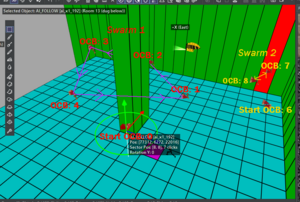
- Place the first AI_FOLLOW object on the same square as the FISH_EMITTER with an OCB of 0. This will tell it there is a path to follow. However, it will only start its path at an AI_FOLLOW from the next one with an OCB of 1. Continue placing them with increasing OCBs until the end of the patrol route. Then, the fish will swim back to the AI_FOLLOW object with OCB1.
- To create a different path for another school of fish, you need to skip an OCB number between the last OCB of the previous path and the first OCB of the new path. This way, the engine can distinguish which numbers belong to which swarm. The first AI_FOLLOW (the one on the same square as the FISH_EMITTER) is not part of the patrol route, but it also requires an OCB.
- If you omit an AI_FOLLOW object on the fish emitter square, the fish will follow a random target within a solid spheroid inside the water room.
- In the image below: Between the last ocb (4) and start of the new path (OCB 6) has to be a gap (no object with OCB 5) so that the engine knows there are 2 different paths.
If a CORPSE object is in the water, then the fish will be distracted and feast on that, rather than the player.